

The Public API, organization API keys, and personal access tokens are available on Pro and Enterprise plans with an active subscription.
Hosted APIs
US Hosted API (allquiet.app)
- Swagger Documentation: https://allquiet.app/api/public/swagger-ui/index.html
- JSON: https://allquiet.app/api/swagger/public-v1/swagger.json
EU Hosted API (allquiet.eu)
- Swagger Documentation: https://allquiet.eu/api/public/swagger-ui/index.html
- JSON: https://allquiet.eu/api/swagger/public-v1/swagger.json
Authentication
You can authenticate your API requests in two ways. Both methods are equivalent — choose the one that best fits your client.- Using the
X-Api-Keyheader:
- Using the standard Authorization Bearer token:
your-api-key. Out-of-scope calls return 403.
Choose a credential
Organization API keys are for pipelines and other machine-to-machine automation. Personal access tokens never do more than that person can do in the product, even if the token’s scopes look broader.
Organization API keys
Create and manage organization API keys under Organizations → [your organization] → API Keys. Creating or editing a key is available to the Organization Owner and the Billable User.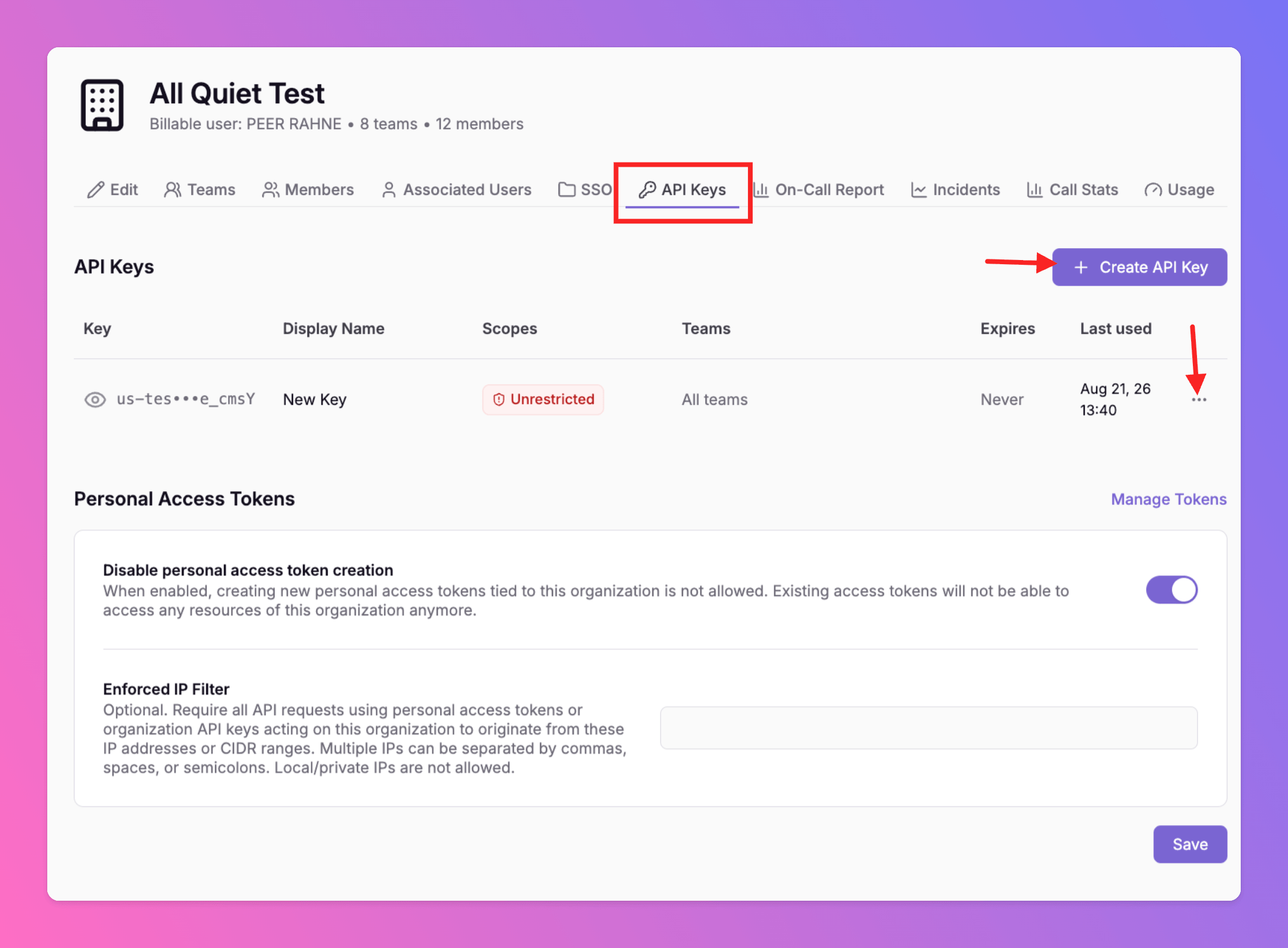
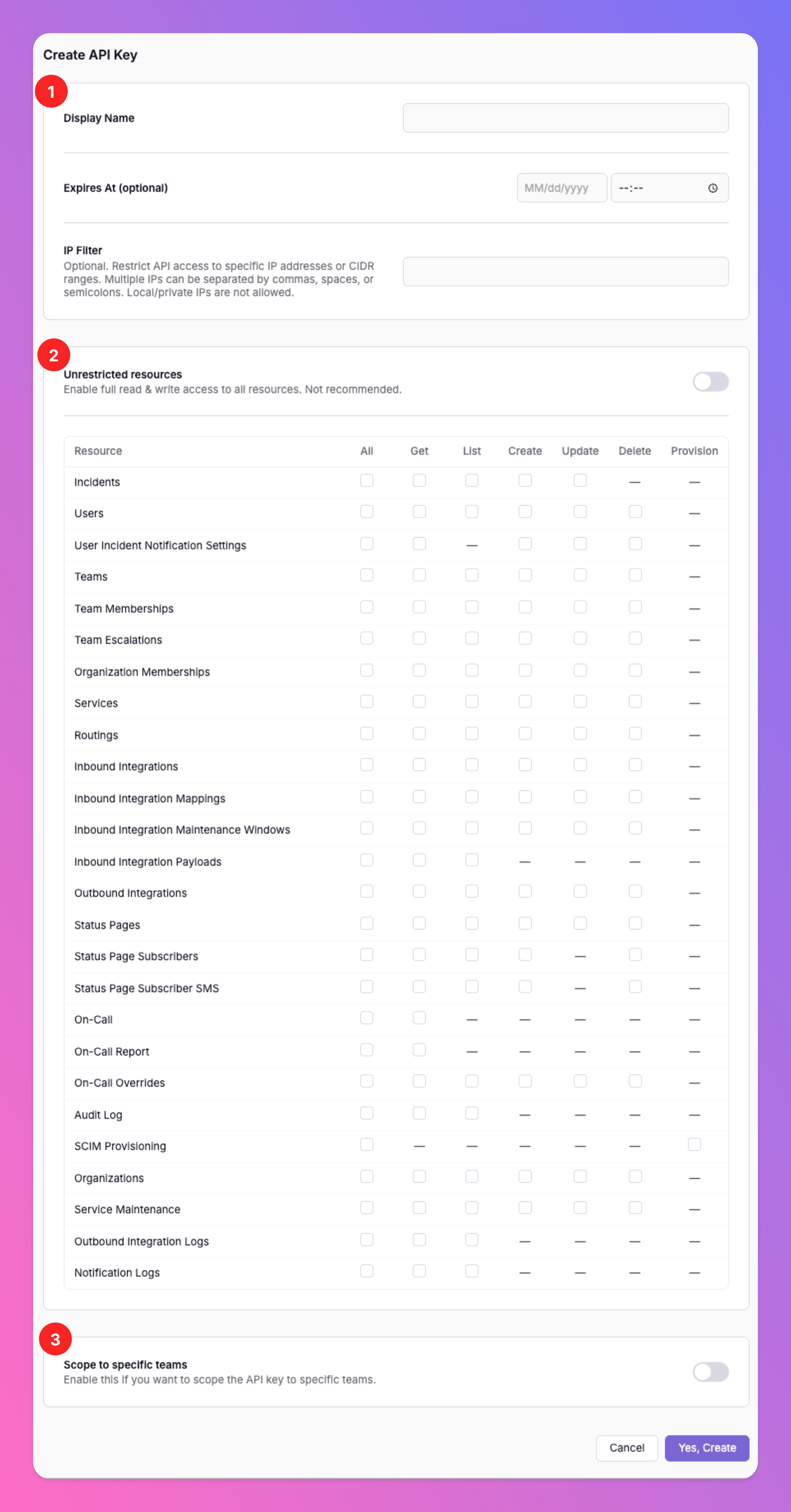
- Display name, optional expiry, and an optional IP Filter (public IPs or CIDR ranges; private/local IPs are not allowed).
- Resources and permissions — grant only what the key needs, per resource (for example Incidents, Teams, On-Call, Integrations, Status Pages, Audit Log). Permissions are get, list, create, update, and delete where that resource supports them. SCIM uses a separate provision permission on organization keys only.
- Teams — optionally Scope to specific teams. If you leave this off, the key can act on all teams in its organization scope.
Expired keys and last used
Expired organization keys stay in the list, marked expired. They are read-only except Revoke — you cannot edit scopes after expiry. Each key shows last used time, IP, user agent, and action.Personal access tokens
A personal access token (PAT) lets a person (or an agent acting as that person) call the Public API as themselves. Create tokens under Account → Security → Personal Access Tokens → Create personal access token.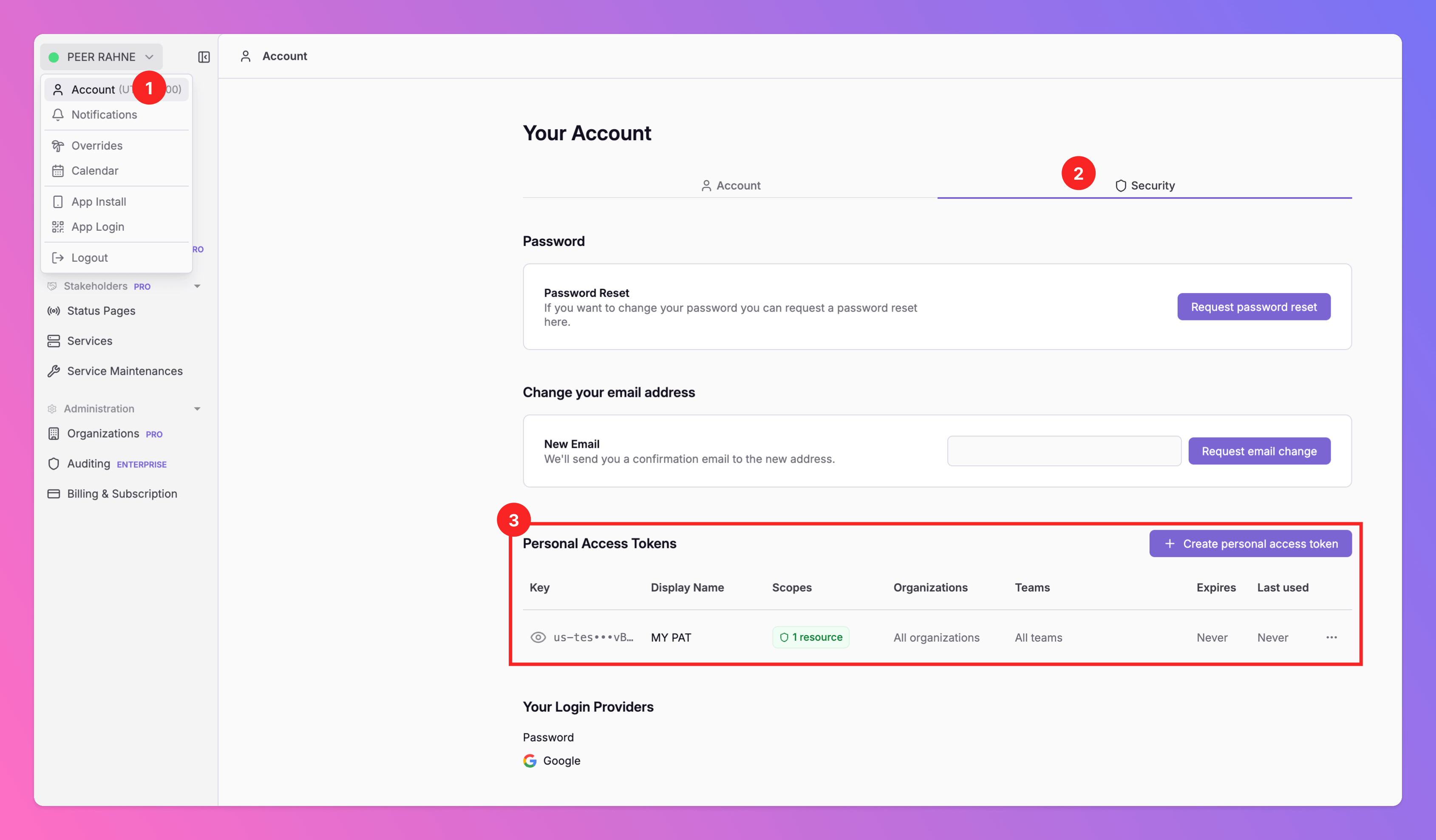
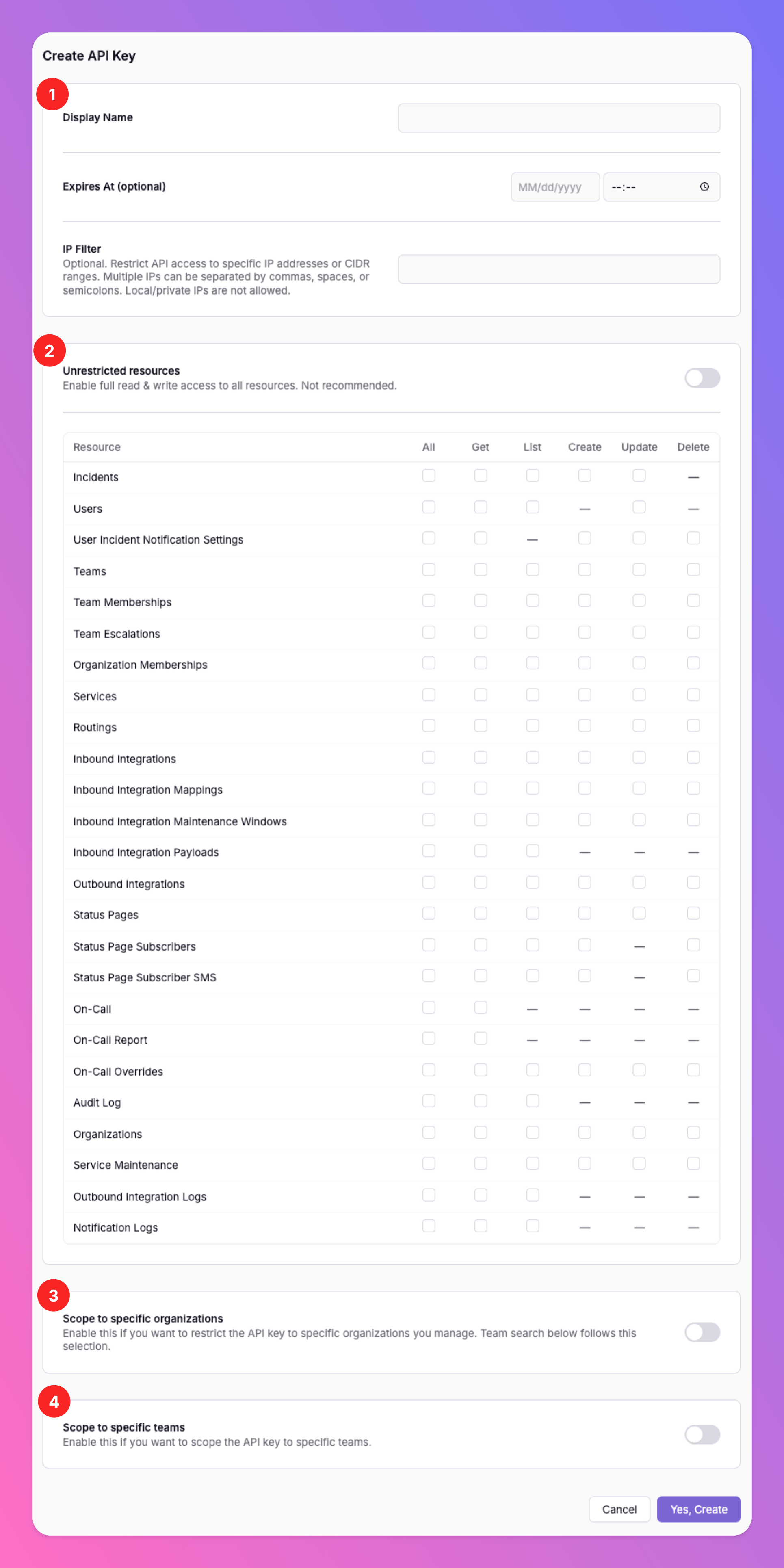
- Display name, optional expiry Optional IP Filter
- Resource scopes and permissions (get / list / create / update / delete)
- Optional Scope to specific organizations (orgs you belong to)
- Optional Scope to specific teams
- Include SCIM
- Create or delete users
- Lock resources as provisioned, or change already provisioned (UI-locked) resources
Organization control of personal access tokens
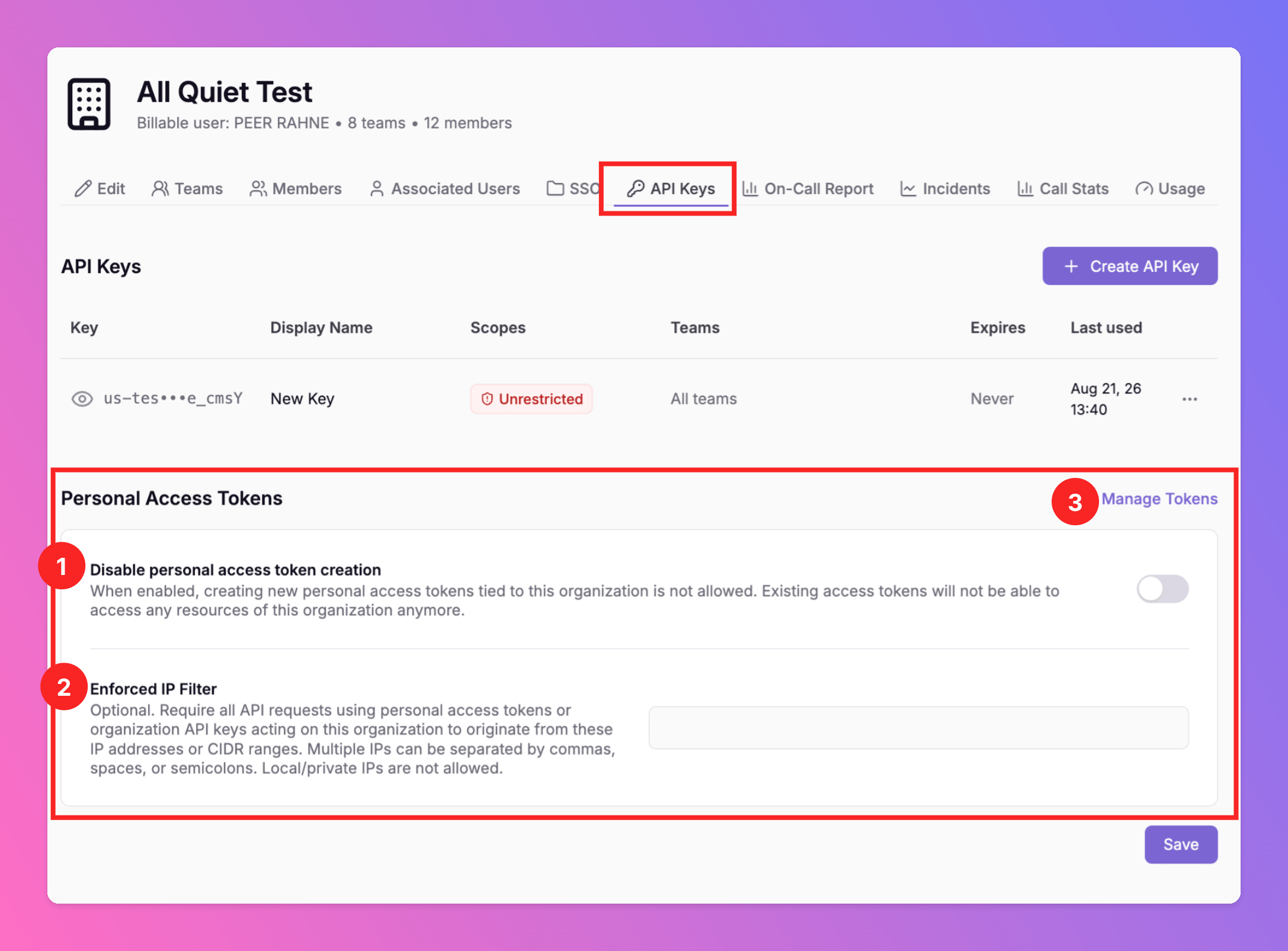
Organization owners can stop new PATs and govern PATs that belong to users in the org. Open Organizations → [your organization] → API Keys, then the Personal Access Tokens section. Policy and revocation are available to the organization Owner and the billing account holder.- Disable personal access token creation — when on, users cannot create new PATs that would be tied to this organization, and existing PATs can no longer access this organization’s resources.
- Enforced IP Filter — optional org-wide rule. All public API requests that act on this organization (PATs and organization API keys) must come from these public IPs or CIDR ranges.
- Manage Tokens — view and revoke personal access tokens of users provisioned into this organization (display name, scopes, teams/orgs, expiry, last used). For compliance, only provisioned users’ tokens are listed.
Provisioned resources
Provisioned means the resource is treated as managed outside the click UI and is read-only in the web app, so Git/Terraform stay the source of truth. Provisioned resources include teams, integrations, status pages, routings, memberships, and similar.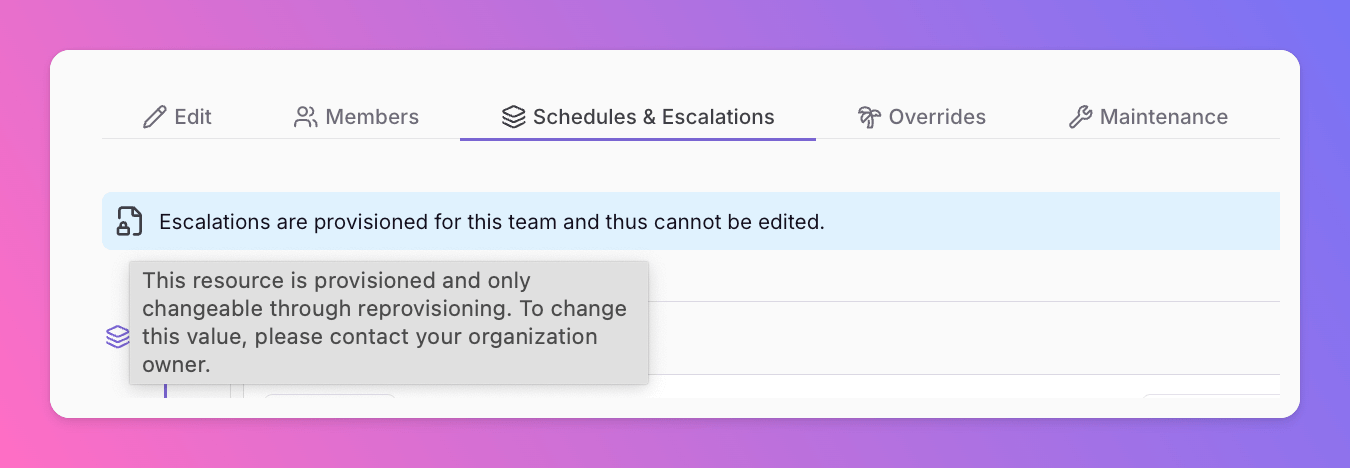
- Create without
provision=true→ the resource stays editable in the UI. - Update without a provision flag → the existing lock state is preserved (unlocked stays unlocked; already locked stays locked).
- Terraform → still provisioned / UI-locked. That provider behavior is unchanged.
- PAT → cannot lock; cannot edit already locked resources.
provision=true on create or update. Pass provision=false on update if you intentionally want to release the lock. This parameter is not available on PATs.
If you do nothing, resources you create via PAT or organization API key remain editable in the product. Existing automations that assumed “anything we write via API is locked in the UI” need to either use Terraform or pass provision=true on organization keys.
Using the API with agents
All Quiet is the control plane for your agents — not a vendor chatbot over your incident data. You bring your own LLM. Inference stays on your side (EU or US data residency for All Quiet data). We do not run models on your incidents.- Every user can get a scoped PAT; organization keys remain for pipelines and Terraform.
- The public API covers incidents, teams, escalations, on-call, overrides, inbound/outbound integrations, mappings, payloads, status pages, routing, users, organizations, and audit logs — each with its own get/list/create/update/delete scopes.
- Guardrails: per-resource scopes, optional team and org allowlists, expiry, IP filters. Out-of-scope calls return 403.
Audit logging of keys
Revealing an organization API key or personal access token is recorded as a read/view for security — not only create, update, and revoke.- Auditing — the standard audit log records an API key reveal as Viewed.
- Auditing → API Key Events — dedicated key lifecycle: Created, Updated, Revoked, Viewed, Authenticated, Authentication Failed (with IP and user agent).