> ## Documentation Index
> Fetch the complete documentation index at: https://docs.allquiet.app/llms.txt
> Use this file to discover all available pages before exploring further.
# Outbound Integrations
> Connect your favorite notification tools to All Quiet
Only Team Administrators, Organization Administrators and Organization Owners have the permissions to create and edit Integrations.
All Quiet isn't just about managing incidents; it's about making sure your whole tech stack knows what's happening, in real-time. Our outbound integrations are the bridges between All Quiet and your favorite notification tools, ensuring nothing slips through the cracks.
## Built-in integrations
Send alerts from All Quiet to the tools you use. We have a generic outbound webhook integration as well as a growing list of pre-built integrations like [Slack](/integrations/outbound/slack) and more:
Troubleshooting: Outbound Integrations Never Fire
If incidents look fine in All Quiet but **Slack, Jira, webhooks, or other outbound tools** never see updates, the outbound integration may still be configured correctly—**[advanced routing](/advanced/routing)** often decides what actually runs for each incident.
* Find **[routing rules](/advanced/routing)** whose **conditions match** the incident (after [payload mapping](/essentials/inbound#mapping-payloads)).
* Under **[Choose Channels](/advanced/routing#choos-channels)**, check **Mute all Integrations**, or rules that only enable a **subset** of outbound integrations (meaning others are muted by these rules).
* Under **[Configure Actions](/advanced/routing#configure-actions)**, check **`Discard`**, **snooze**, and other actions that suppress or delay outbound behavior.
* If your workflow depends on it, confirm the incident was **[forwarded](/essentials/incident#forwarding)** to the outbound integration.
For the full “no notification” checklist (including **snooze** and **mute** on the integration or team), see **[Inbound — New incident, no notification](/essentials/inbound#inbound-troubleshooting-no-notification)**.
When outbound tools still look silent but routing and mute settings look correct, inspect **[outbound integration activity logs](#outbound-integration-activity-logs)** on the integration or incident—especially **Skipped** and **Failed** outcomes, and whether routine skips were filtered (see [retention and filtering](#retention-and-filtering) below).
## Outbound Integration Activity Logs
Outbound Integration Activity logs are available to **Organization Owners**, **Organization Administrators** (for the integration’s organization), and **Team Administrators** of the team that owns the integration.
All Quiet records **activity history** for outbound integrations: each time an integration processes an incident, sends or receives webhooks, creates or updates tickets, messages, or documents, or handles user interactions (for example Slack buttons). These logs help administrators troubleshoot why an integration did or did not act on an incident.
Activity logs are **diagnostics-style** data (similar to [notification logs](/essentials/incident#incident-details-notification-history) on incidents and [routing rule execution logs](/advanced/routing#routing-execution-history-history-tab)), not a full audit trail for every team member. For organization-wide compliance logging, see **[Auditing](/advanced/auditing)**.
You can inspect the **same underlying log records** in two places, scoped either **by incident** ([Outbound Integration Activity](/essentials/incident#incident-details-outbound-integration-activity) in incident details) or **by integration** ([Outbound history](#outbound-history) on an outbound integration). Cross-links connect incident ↔ integration.
### Retention and Filtering
* **Availability**: logs are available starting **May 20, 2026** onward (as shown in the UI).
* **Retention**: each entry is kept for **14 days**, then removed automatically.
**What is not stored (by default):** Many routine **Skipped** outbound events are filtered out so history stays actionable—for example when an incident is snoozed, a routing rule mutes the channel, or configuration is missing. **Inbound** webhook logs are always kept.
### Operations
Operations saved in the Activity History are:
| Operation | Meaning |
| --------------------------------------- | ----------------------------------------------------------------------------------------------------------- |
| **Process** | All Quiet ran the integration for this incident event (create or update ticket, post message, and similar). |
| **WebhookEvent** | Inbound webhook from the external system. |
| **Interaction** | User interaction in the integration (for example a button or action in chat). |
| **IssueCreate** / **IssueUpdate** | External issue or ticket created or updated. |
| **MessagePost** / **MessageUpdate** | Chat message posted or updated. |
| **DocumentCreate** / **DocumentUpdate** | Document or page created or updated. |
| **Forward** | Incident forwarded to another integration. |
### Outcomes
Operations saved in the Activity History are:
| Outcome | Typical meaning |
| ------------- | ---------------------------------------------------------------------- |
| **Succeeded** | Action completed successfully. |
| **Failed** | Action failed—check description, HTTP status, and errors. |
| **Skipped** | Intentionally not run (for example preconditions, routing, or snooze). |
| **NoOp** | Ran but made no effective change. |
| **Discarded** | Event or action was discarded. |
When present, expanded rows can show **payload details**: integration-specific identifiers (issue keys, channel IDs, repository names, webhook URL and method, and similar)—not full message bodies or secrets. Examples include Jira or Linear issue keys, Slack channel and message IDs, ServiceNow `sys_id`, and webhook URL or method for generic outbound webhooks.
Outbound History
Activity history is available to **Organization Owners**, **Organization Administrators** (for the integration’s organization), and **Team Administrators** of the team that owns the integration.
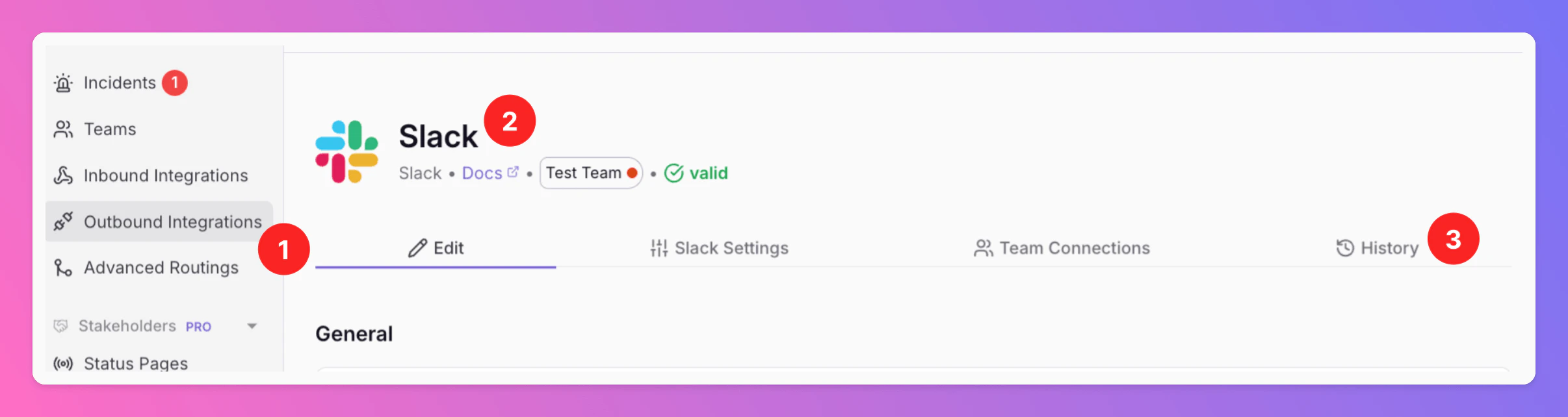
Go to **Integrations → Outbound** (1), open an integration (2), and select the **History** tab (3).
 ### What the Table Shows
A paginated table (**50 entries per page**, **Load more** for older entries), newest first:
| Column | Content |
| --------------- | ------------------------------------------------------------------------------------------------------------------------------------------------------------------- |
| **Processed** | When the log entry was recorded. |
| **Direction** | **Inbound** (webhook received from the external system) or **Outbound** (request sent to the integration). |
| **Outcome** | Succeeded, Failed, Skipped, and similar (see [Outcomes](#outcomes)). |
| **Operation** | What happened (see [Operations](#operations)); **Code** is shown under the operation when present. |
| **Description** | Human-readable summary. |
| **Action** | **Intent badge** for the related incident event, when any. |
| **Time** | Timestamp of the related incident event. |
| **Incident** | Short incident ID linking to incident details with **[Outbound Integration Activity](/essentials/incident#incident-details-outbound-integration-activity)** opened. |
### What the Table Shows
A paginated table (**50 entries per page**, **Load more** for older entries), newest first:
| Column | Content |
| --------------- | ------------------------------------------------------------------------------------------------------------------------------------------------------------------- |
| **Processed** | When the log entry was recorded. |
| **Direction** | **Inbound** (webhook received from the external system) or **Outbound** (request sent to the integration). |
| **Outcome** | Succeeded, Failed, Skipped, and similar (see [Outcomes](#outcomes)). |
| **Operation** | What happened (see [Operations](#operations)); **Code** is shown under the operation when present. |
| **Description** | Human-readable summary. |
| **Action** | **Intent badge** for the related incident event, when any. |
| **Time** | Timestamp of the related incident event. |
| **Incident** | Short incident ID linking to incident details with **[Outbound Integration Activity](/essentials/incident#incident-details-outbound-integration-activity)** opened. |
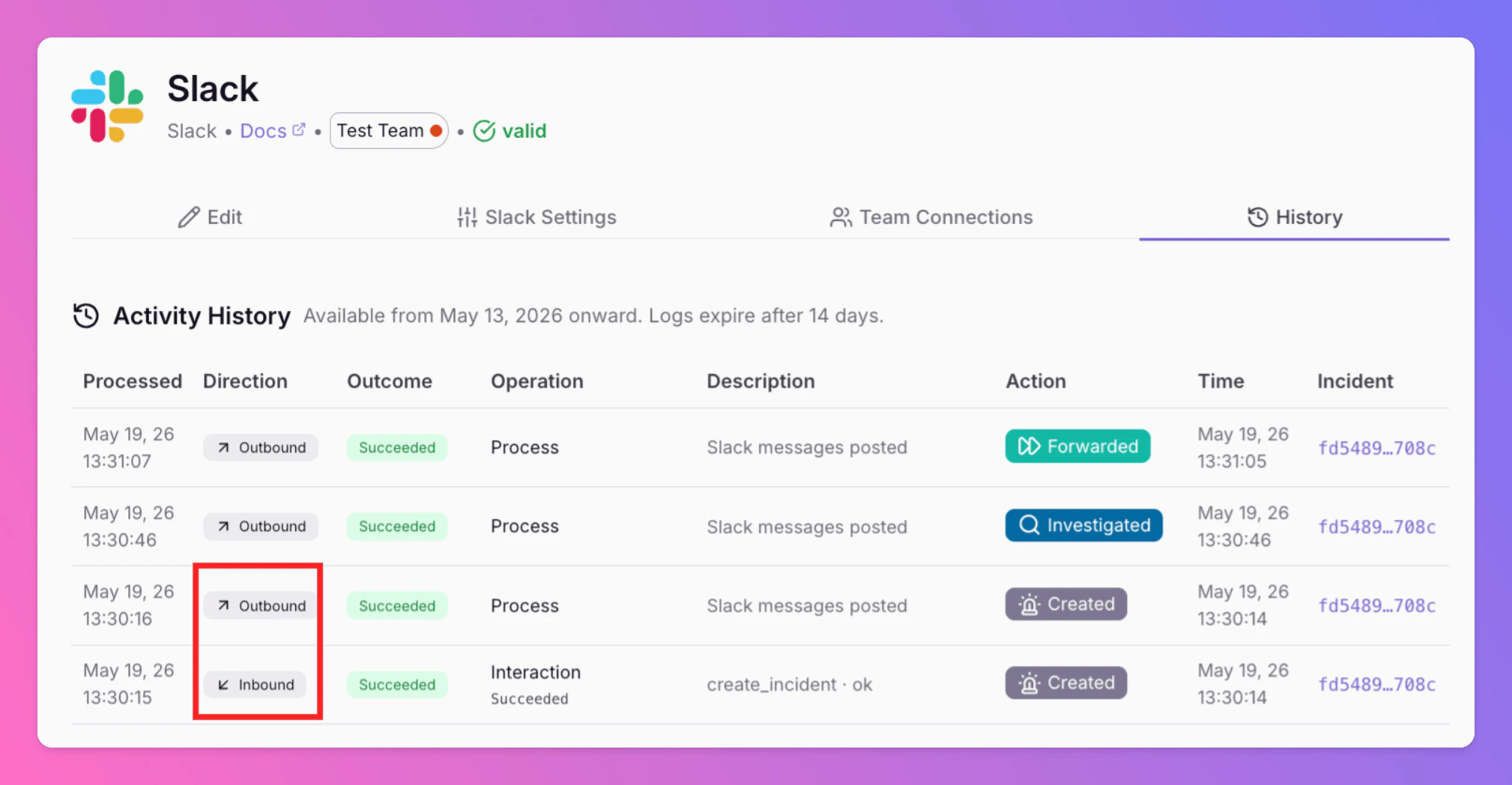 If nothing has been recorded yet, the empty state explains that no activity exists yet, plus the availability and retention note above.
Troubleshooting With Activity History
* **No logs for expected skips** — Snoozed incidents, routing mutes, missing credentials or channels, and similar **Skipped** outcomes are often **not persisted** unless **Debug mode** is on for that integration.
* **Inbound vs outbound** — **Inbound** rows explain webhooks *from* Slack, Jira, and similar; **Outbound** rows explain calls *to* those systems.
* **Not ServiceNow API debug** — [ServiceNow](/integrations/outbound/servicenow) integrations may expose a separate admin **API debug** view; that is distinct from this general outbound activity history.
## Propose a new integration
Didn't find your tool here? Reach out to [support@allquiet.app](mailto:support@allquiet.app) and let us know your preferred integration. We're always happy to grow our integrations list.